NEW AI Agent CRM with Wizard Control

AI Agent and CRM System for finance: Loans, investments, insurance

A new type of Customer Management System. Chats, leads, pipelines, outreach, tasks, documents, analytics, all driven by AI agents and a Wizard command layer.

AI Customer Management System

An AI operating system for customer work

Ten modules. One AI layer. Everything your team needs to find leads, talk to them, close them and never let anything fall through the cracks.

01 / 08
Active Applications

One command center for every applicant conversation

All channels, WhatsApp, email, phone, web, in a single AI inbox tied to applications, policies and portfolios. Compliance-ready logging.

  • Every chat linked to application, policy or portfolio
  • AI screens applicants, collects KYC docs, answers product questions
  • Hot applicants and renewals auto-flagged for advisors
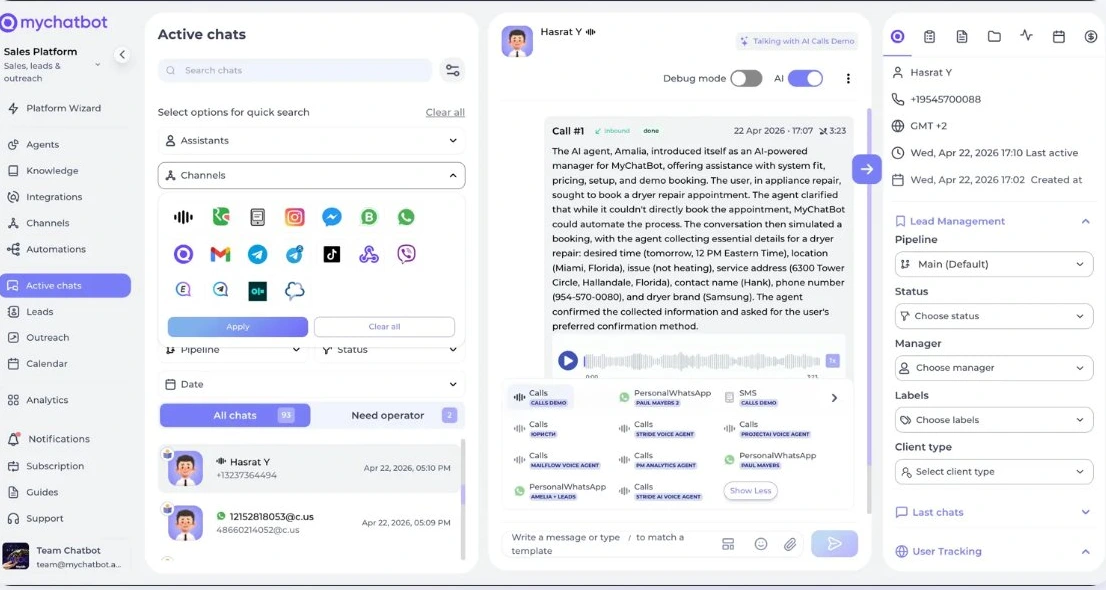
Active Applications, unified AI inbox with applicant file
02 / 08
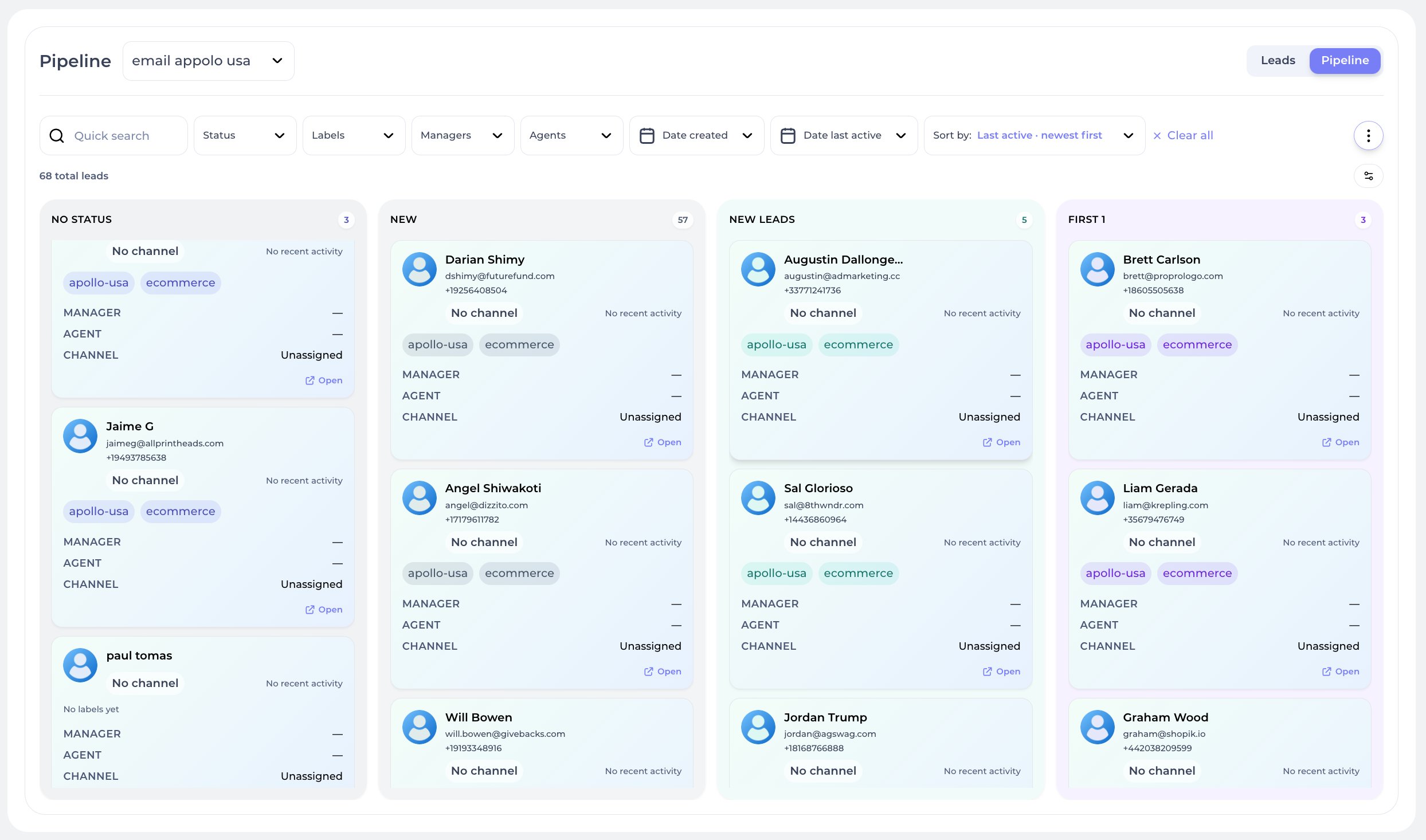
Application Pipelines

Application pipelines: never lose a client

Run separate pipelines per product (loan, mortgage, insurance, investment). AI scores applicants, surfaces stalled apps.

  • Pipelines per product, advisor or branch
  • Application-score on every card, stalled-app alerts
  • AI proposes next action: doc request, callback, alternate product
Application pipeline, Kanban view with applicants across stages
03 / 08
Advisor Calendar

A calendar tied to advisors, clients and meetings

Every consultation, signing, review meeting in one calendar, tied to the client portfolio and to your AI.

  • Day / Week / advisor views with drag-to-reschedule
  • Meetings auto-attach to the matching client and product
  • AI confirms meetings and sends prep documents
Advisor Calendar, week view with advisors and meetings
04 / 08
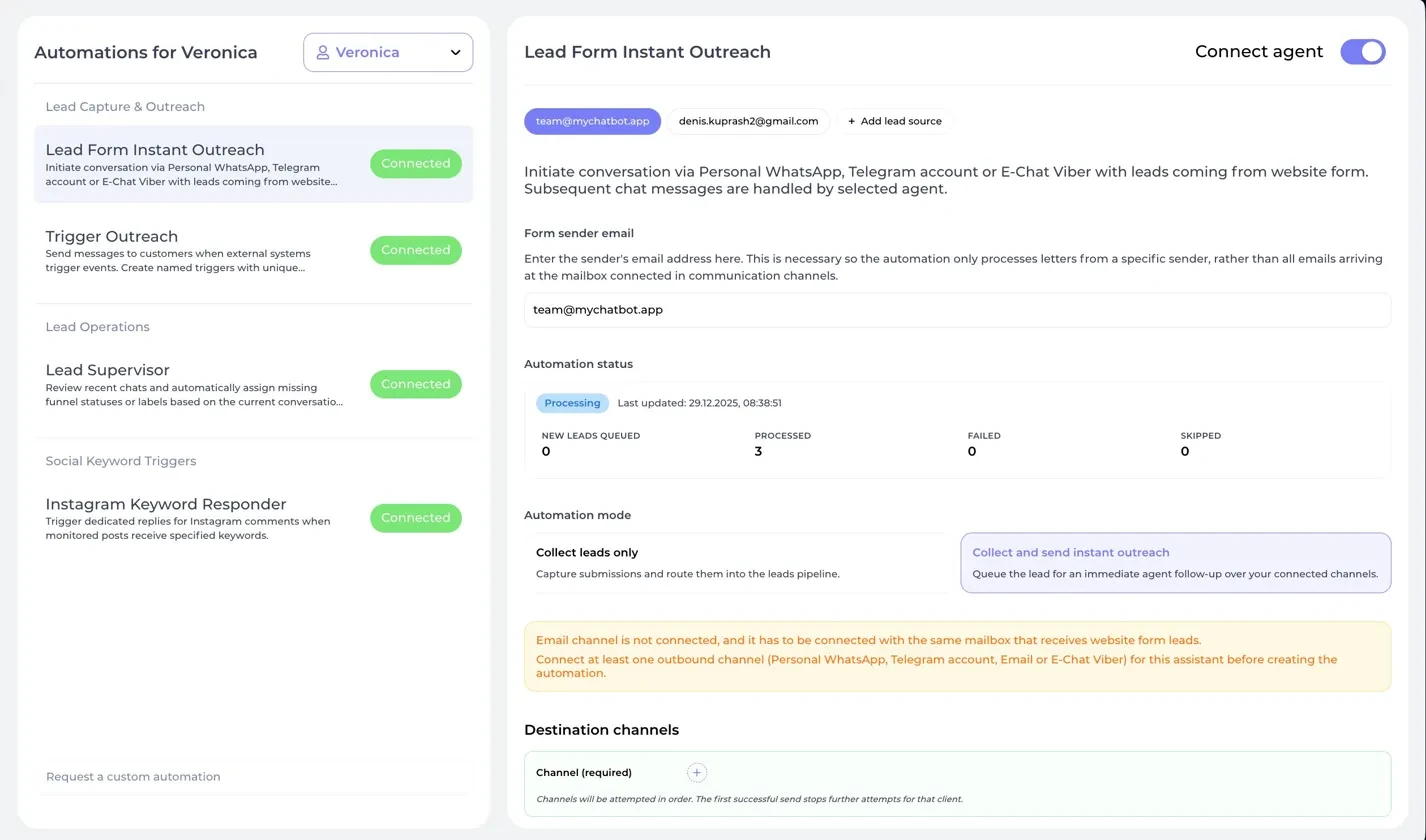
Any source → AI First

Connect every channel. AI replies first to every applicant

Website forms, ads, messengers, webhooks, every lead is routed through AI agents that open the conversation instantly. No cold queues. No forgotten contacts.

  • Capture from forms, DMs, ads, phone calls and API
  • Instant AI screen through Personal WhatsApp, Telegram, Voice
  • Auto-assign by product, advisor or branch
Application Outreach, finance lead capture automation
05 / 08
Application Triggers

AI-triggered finance automations

Wire any external event, payment, booking, form, webhook, into a chained AI sequence. Reactivation, reminders, confirmations, upsells, delivered by agents through the right channel.

  • Webhook-driven triggers with named sequences
  • Agent instruction or custom message per step
  • Multi-channel routing, tries until it lands
Application Trigger Outreach, finance event-based AI
06 / 08
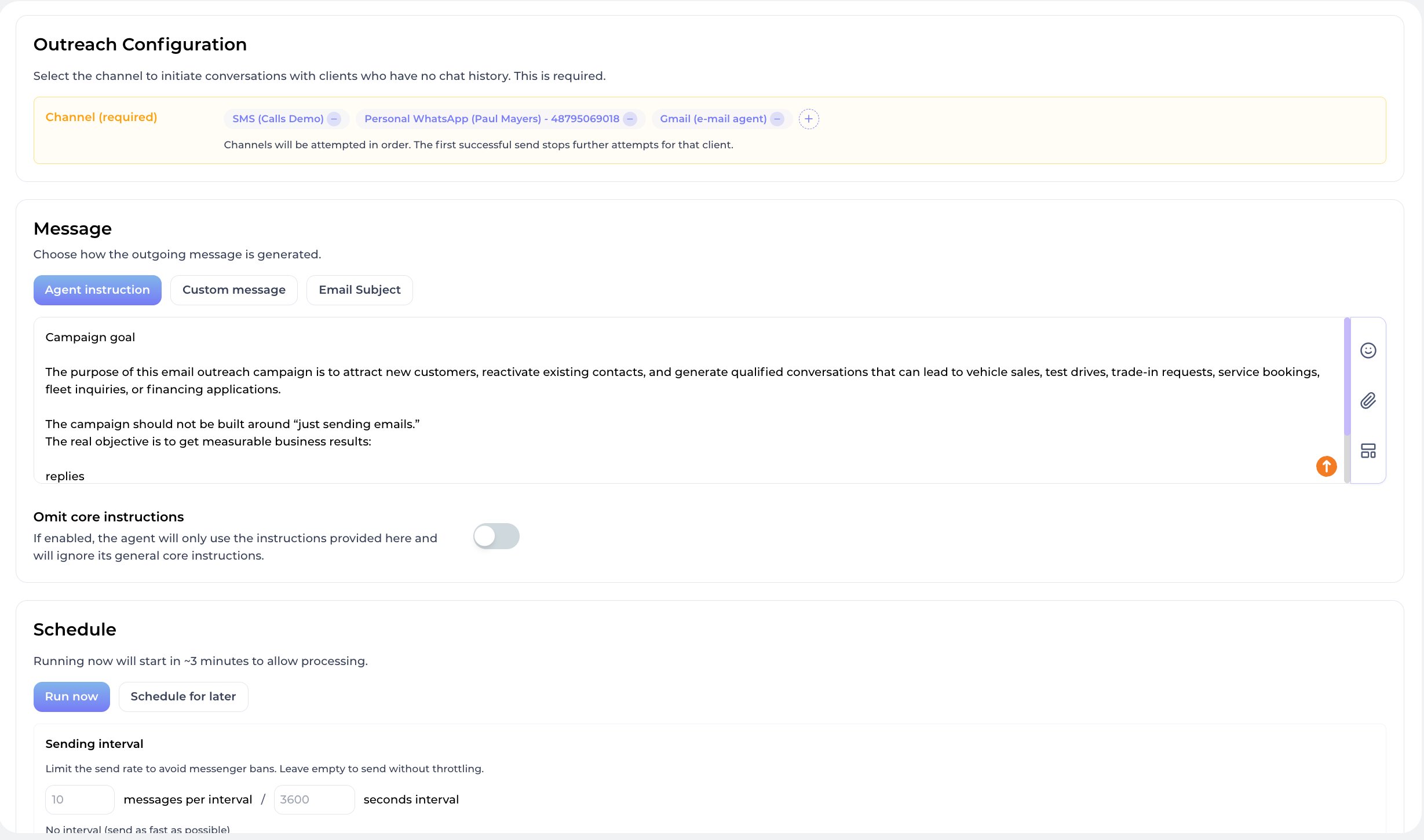
Client Outreach

Personal offers for every client segment

Segment clients by product, portfolio size, life stage. AI sends personalized renewal reminders and cross-sell offers.

  • Segments: active, lapsed, prospects, VIP, by product
  • AI personalizes by product history, advisor and portfolio
  • Throttled, regulator-compliant cadence
Client Outreach, AI campaign builder for finance
07 / 08
Firm Wizard

Your AI firm control layer

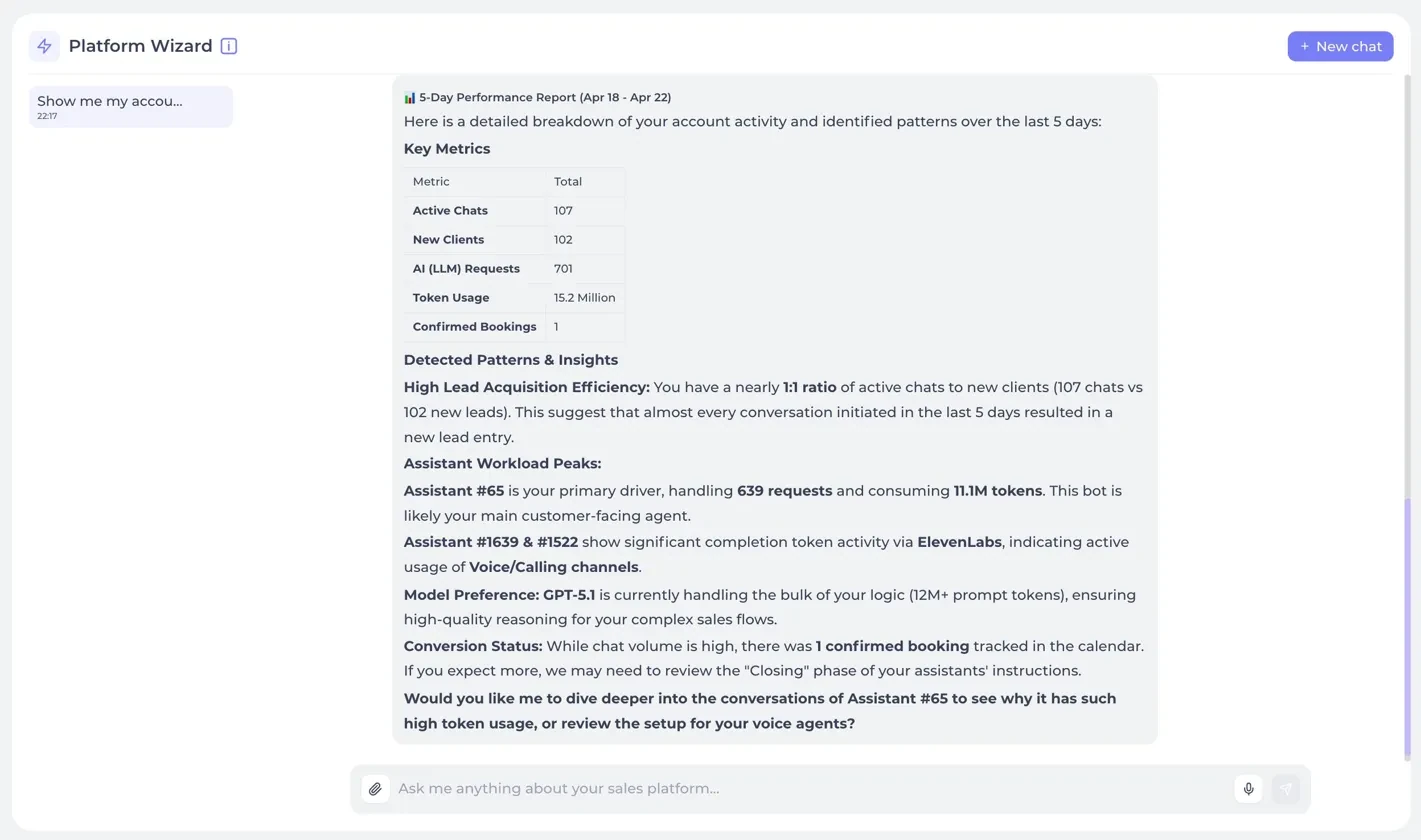
Wizard is a Claude-grade AI inside your finance CRM. Ask which advisor closes most apps, which renewals are at risk, which channel brings best clients.

  • Ask anything across applications, policies and clients
  • Wizard creates tasks, sends docs, tunes underwriting agents
  • Multi-chat history per firm, fully auditable for compliance
Firm Wizard, AI control layer for finance
08 / 08
Firm Analytics

An AI firm control dashboard

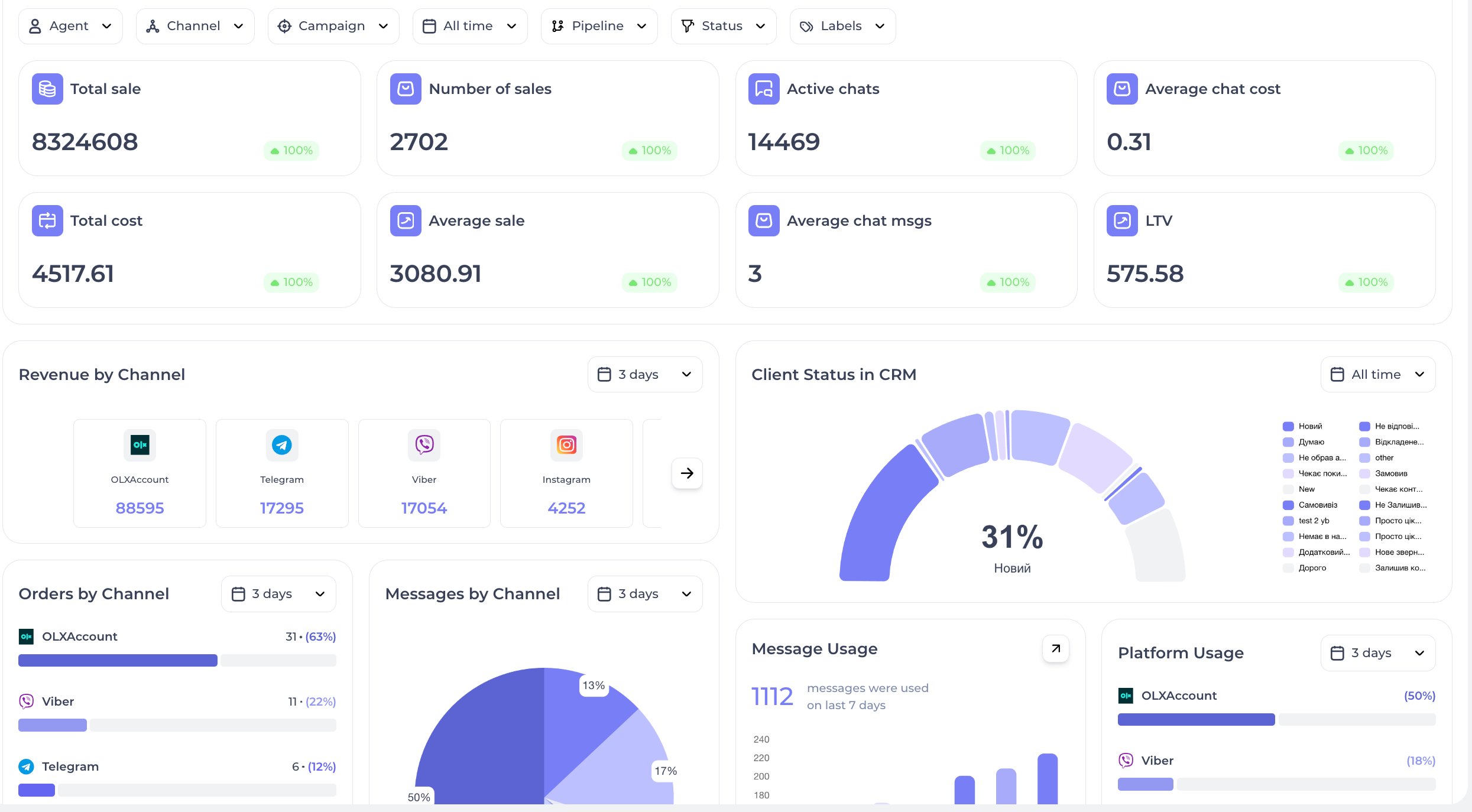
Apps submitted, conversion rate, advisor leaderboard, AUM growth, renewal rate, channel ROI. Wizard tells you what to fix.

  • KPIs: app conversion, AUM, renewals, advisor productivity
  • AI insights: best lead sources, best advisors, drop reasons
  • Export to PDF, Google Sheets or live webhook
Firm Analytics, applications, advisors and revenue

Where finance leads come from

Loan, mortgage, insurance and investment inquiries arrive through website forms, Facebook and Instagram Lead Ads, messengers, phone calls and partner or in-house systems. The Active chats inbox collects conversations from every channel in one list.

  • Website forms. Lead Form Instant Outreach watches the mailbox that receives your form notifications and extracts the name, phone, email and Telegram username. It then either just saves the lead or starts a conversation through a channel such as Personal WhatsApp, Telegram account, Gmail, Calls or SMS.
  • Meta Lead Ads. Lead Forms saves every submission to Contacts. With the Ads Manager capability (included with the Multipro and Corporate plans), each form can also go to its own agent, for example car loans to one agent and travel insurance to another.
  • Partner and in-house systems. Trigger Outreach gives each event its own webhook URL. Your system posts a phone number, a name and a context line. The agent creates the lead and can send the first message.
  • Messengers and phone. The website widget, WhatsApp, Telegram, Viber, Instagram and Facebook Messenger take incoming questions, and the Calls channel adds a transcript and recording to the client’s chat.

Three agent workflows for a finance team

1. Pre-screening a loan or insurance inquiry

  1. The agent answers questions about products, terms and required documents using your Knowledge Base: FAQ entries, Business Documents and Business Files.
  2. Client Context collects the fields you define, such as requested amount, purpose and term, and keeps them with the client on every channel.
  3. Following your instructions, the agent sets a status such as Documents requested and a product label.
  4. Files the client sends in the chat appear on the client card under Documents, in the Received section, where an advisor reviews them.
  5. When your criteria are met, the agent notifies the team; with Flight Control connected, a Telegram group gets the client’s name, phone, email and a chat link.

2. Booking a consultation with an advisor

  1. With Google Calendar connected, the agent checks that a slot is free, then books the event with the advisor and the client as attendees and the client’s request in the description. If you use the native Calendar instead, add each advisor as a staff member and create a Consultation service.
  2. Routing rules, such as which advisor handles mortgages, go into the agent’s instructions. For the native Calendar they go into Booking Instructions.
  3. The native Calendar sends no reminders, so turn on Allow agent to self schedule follow-ups and let the agent schedule one before the meeting.

3. Missing documents, renewals and reactivation

  1. A postponed follow-up targets the Documents requested status. If the client goes silent, each step goes out after the delay you set, and any reply stops the sequence.
  2. For renewals, your policy or loan system calls a Trigger Outreach webhook with the client’s phone number and context, such as the renewal date. The agent writes the message from that context and sends it through your selected channels, inside the Sending Window if set.
  3. For reminder calls, turn on auto-recall in the Calls channel: unanswered calls are retried up to 3 times. A call with no conversation sets the NotAnswered status, and a follow-up targeting that status, attached to the voice agent, can continue the contact in a messenger.

CRM setups for finance teams

The built-in CRM covers the basics:

  • Create a pipeline for each product line in Account Settings → Pipelines, and point each assistant to its pipeline under Lead Management.
  • With Task Manager, the agent can file tasks tied to a lead, such as checking a document the client sent.

Teams on HubSpot, Salesforce, Zoho, Bitrix24 or Kommo connect it on the Integrations page. Depending on the CRM and the entities you enable, the agent can:

  • create a lead or deal, find or create the contact by phone number, set the status and attach a link to the chat;
  • tag the record’s source so AI-sourced applications are easy to report on;
  • update an existing record when the client is ready to proceed.

In Entities & Data Fields Configuration, tick only the fields the agent may fill, turn on Lead Phone Required and run Sync statuses so stage names match. Step by step: Connect your CRM.

Limits and where people stay involved

  • Decisions. State in the instructions that the agent does not approve applications, promise terms or give personal investment advice. When those questions come up, it hands the chat to an advisor.
  • Sources. Keep rates, conditions and document lists current in the Knowledge Base, and leave Web Search off so answers come only from it.
  • Hand-off. Handoff Control lets an operator take over with a stop word or simply by replying (implicit mode), with silent handoff and an auto return to the AI, after 24 hours by default. See Human Hand-off.
  • Off-hours. Outside Work Hours the agent stays silent and does not answer those messages later, so an advisor should review them.
  • Security and pacing. Treat each Trigger Outreach webhook URL like a password. For large campaigns, set a sending interval so you do not trip spam limits or channel bans.

Frequently asked questions

Can the AI agent collect documents from applicants?

The agent asks for the documents listed in your instructions. Files the client sends in the chat are saved to the Documents tab of the client card, in the Received section, where your team reviews them. You can also upload up to 10 documents at a time to the card yourself.

Can we run separate pipelines for loans, mortgages and insurance?

Yes. You create pipelines in Account Settings → Pipelines, and each assistant files its leads into the pipeline selected under Lead Management. On the Standard and Pro plans only one assistant can be active at a time. Multipro and higher plans allow several.

How do renewal reminders reach clients?

Your policy or loan system can call a Trigger Outreach webhook with the client’s phone number and context. The agent then sends a message through the channels you selected, optionally only within a sending window you set. Clients who go silent while in a status such as Documents requested can get reminders from a postponed follow-up sequence.

Which CRMs can the agent write applications into?

CRMs with their own setup guides are HubSpot, Salesforce, Zoho, Bitrix24, Kommo, KeyCRM, SalesDrive and GoHighLevel. The Integrations page also lists others, such as Monday, NetHunt, OneBox CRM and Odoo. Depending on the CRM, the agent creates and updates leads, deals or contacts, filling only the fields you enable. Each assistant can have one CRM connected. On the Standard plan, Spreadsheet Orders is the only integration you can connect.

AI Channels for CRM

AI channels wired into your CRM system

Every conversation, every lead, every chat, flowing into one CRM. 20+ AI-powered channels across messaging, voice, email, SMS, personal accounts and custom APIs, unified under one customer record.

AI Instagram Agent

AI Instagram agent capturing DMs, comments and reactions, every interaction logged as a lead in your CRM.

DMs · Comments · Reactions

AI Facebook Messenger Agent

AI Facebook Messenger agent handling messages, comments and flows, all conversations attached to the CRM contact card.

Messages · Comments · Flows

AI Telegram Bot Agent

AI Telegram bot agent for automated replies, support flows, lead generation, and smart Telegram communication.

Bot · Support · Leads

AI TikTok Agent

AI TikTok agent for comments, direct messages, reactions, likes, and automated TikTok communication.

Comments · DMs · Reactions

AI Calls Agent

AI voice agent for inbound and outbound calls, phone numbers in 100+ countries, automated call scenarios.

Inbound · Outbound · 100+ countries

AI Ringostat Calls Agent

AI calls agent connected to Ringostat for telephony, call tracking, inbound/outbound calls, call analytics.

Ringostat · Tracking · Analytics

AI SMS Agent

AI SMS agent for sending, receiving, automating and scaling SMS communication with clients.

Global · 2-way · Automation

AI WhatsApp Business Agent

AI WhatsApp Business agent for official business communication, automated replies, broadcasts, and sales workflows.

Business API · Broadcasts · Sales

AI WhatsApp Personal Agent

AI WhatsApp personal agent for private chats, personal numbers, and all conversations inside one AI system.

Private · Personal · Unified

AI Website Widget Agent

AI website widget agent for sales, support, lead capture, and AI communication directly on your website.

Widget · Sales · Lead capture

AI Gmail Agent

AI Gmail agent for email communication, inbox automation, replies, and AI-powered email workflows.

Inbox · Replies · Workflows

AI Telegram Personal Agent

AI Telegram personal agent for personal chats, group communication, message analysis, and AI chat management.

Personal · Groups · Analysis

AI Webhooks API Agent

AI webhooks API agent for connecting any external application, custom API, automation, or AI workflow.

API · Webhooks · Custom

AI Viber Bot Agent

AI Viber bot agent for automated Viber messaging, support conversations, and AI communication flows.

Bot · Support · Automation

AI Viber Personal Agent

AI Viber personal agent for personal messaging, private chats, and AI-managed Viber communication.

Personal · Private · Managed

AI OLX Agent

AI OLX agent for managing client messages, inquiries, and sales communication from OLX in one system.

Inquiries · Sales · Unified

AI Twilio Agent

AI Twilio agent for voice, messaging, phone numbers, SMS automation, and global AI communication workflows.

Voice · SMS · Global

AI Google Agent

AI Google agent for Google-based communication, integrations, authentication, and AI business automation.

Google · Auth · Automation

AI iOS Chat Agent

AI iOS chat agent for mobile messaging and push, leads and replies flow directly into your CRM.

iOS · Push · Custom

AI Android Chat Agent

AI Android chat agent for mobile messaging and push, every interaction becomes a tracked CRM lead.

Android · Push · Custom
AI Templates for CRM

Ready-made finance templates to launch your business

Twenty ready-made finance templates, agent accounts and proven scenarios, pre-configured for banks, brokers, insurance and fintech.

Mortgage Brokerage
Mortgage Brokerage
Finance Mortgage

Qualifies borrowers and matches them to lenders

Personal Loans
Personal Loans
Finance Lending

Screens loan applications and sends underwriting updates

Auto Loan Provider
Auto Loan Provider
Finance Auto

Qualifies auto-loan applicants and books closings

Health Insurance Agency
Finance Insurance

Quotes plans and handles claim inquiries

Life Insurance Agency
Finance Insurance

Qualifies prospects and books policy consultations

Auto Insurance
Auto Insurance
Finance Insurance

Quotes policies and handles claim inquiries

Investment Brokerage
Finance Investment

Qualifies investors and books portfolio reviews

Crypto Exchange
Crypto Exchange
Finance Crypto

Onboards traders and handles support inquiries

Wealth Management
Wealth Management
Finance Wealth

Qualifies high-net-worth clients and books consultations

Tax Preparation Service
Finance Tax

Books tax-prep appointments and reminds about deadlines

Financial Planner
Financial Planner
Finance Planning

Books financial planning sessions and tracks goals

Microfinance Service
Finance Lending

Qualifies small loan applicants and approves quickly

Credit Card Issuer
Credit Card Issuer
Finance Cards

Qualifies card applicants and handles support

Forex Broker
Forex Broker
Finance Trading

Onboards traders and handles platform questions

Pension Fund
Pension Fund
Finance Retirement

Books retirement consultations and tracks contributions

Business Banking
Business Banking
Finance B2B

Qualifies business loan applicants and routes to bankers

Equipment Financing
Equipment Financing
Finance B2B

Qualifies equipment-loan applicants and processes apps

Property Insurance
Property Insurance
Finance Insurance

Quotes property policies and handles claims

Travel Insurance
Travel Insurance
Finance Insurance

Quotes travel policies for trips and bookings

Online Bank
Online Bank
Finance Digital

Onboards customers and handles digital banking support

CRM AI Team

Build an AI team for your CRM

Assign clear roles across sales, support, operations and analytics, and power each agent with the skills your CRM workflow needs.

Agents

Sales Manager
Firm Manager
Closes deals in your CRM
Sales online
9 active tasks
Data Analyst
Application Agent
CRM reporting & insights
Analytics online
7 active tasks
Project Manager
Reactivation Agent
Moves leads through stages
Operations online
8 active tasks
Sales Lead
Underwriting Coordinator
Owns the pipeline
Sales online
11 active tasks
CRM Manager
Product Recommender
Runs the CRM workflow
Operations online
8 active tasks
CEO Agent
Pipeline Manager
Scores and routes new leads
Sales online
5 active tasks
Brand Marketer
Lead Qualifier
Handles CRM tickets & FAQs
Support online
10 active tasks
Finance Lead
CRM Manager
Never lets a CRM lead go cold
Sales online
6 active tasks
Performance Marketer
Support Agent
Runs personalized sequences
Outreach online
12 active tasks
Web Analyst
Reviews Agent
Books calls, syncs to CRM
Operations online
6 active tasks

Skills

Find the highest-value applicant
Leads Scoring

Surfaces the highest-value lead in your CRM right now, ready to be contacted.

Find the top-performing advisor
Team Performance

Identifies who on your team is closing the most deals and the fastest.

Find dropped applications
Team Conversion

Ranks managers by lead-to-deal conversion rate across the CRM pipeline.

Find stalled applications
Pipeline Risk

Flags deals that have not moved between CRM stages for too long.

Find applicants without a reply
Inbox Follow-up

Surfaces every contact waiting on a response, no conversation goes cold.

Find the best lead source
Marketing Attribution

Identifies the channel delivering the most qualified CRM leads.

Find problem stages in underwriting
Funnel Diagnostics

Detects the CRM pipeline stage where most deals get stuck or lost.

Find reasons for declined applications
Insights Revenue

Analyzes closed-lost deals and extracts the top reasons customers walked away.

Show sales dynamics
Analytics Trends

Plots revenue, new leads and closed deals over any time window.

Show manager workload
Team Capacity

Reports how many leads, deals and tasks each manager is handling right now.

News & Updates

What's new in AI CRM

Product updates, case studies and fresh scenarios.

Get started

See AI CRM running on your business

Leave your details, we'll set up a live demo on your channels, with your pipeline and your real leads. No slides, no theory.

  • Personalized 30-minute demo
  • AI agent set up on your real channel
  • Deployment plan tailored to your team

By submitting, you agree to our privacy policy. We reply within one business hour.

New type of CRM

This is not the CRM
you used yesterday. This is AI CRM.

Chats, leads, pipelines, calendar, outreach, automations, tasks, documents and analytics, one AI system, one Wizard command layer, zero spreadsheets.