NEW AI Agent CRM with Wizard Control

AI Agent and CRM System for dance schools: Studios, classes, students

A new type of Customer Management System. Chats, leads, pipelines, outreach, tasks, documents, analytics, all driven by AI agents and a Wizard command layer.

AI Customer Management System

An AI operating system for customer work

Eight modules. One AI layer. Everything your team needs to find leads, talk to them, close them and never let anything fall through the cracks.

01 / 08
Client Inquiries

One command center for every client conversation

All studio channels, Instagram, WhatsApp, Telegram, Voice, web booking, in a single AI inbox tied to student profiles, bookings and class history.

  • Every chat linked to student profile, class history and teacher
  • AI books classes, sends prep info, suggests the right level
  • Regular students and those due to rebook auto-flagged for teachers
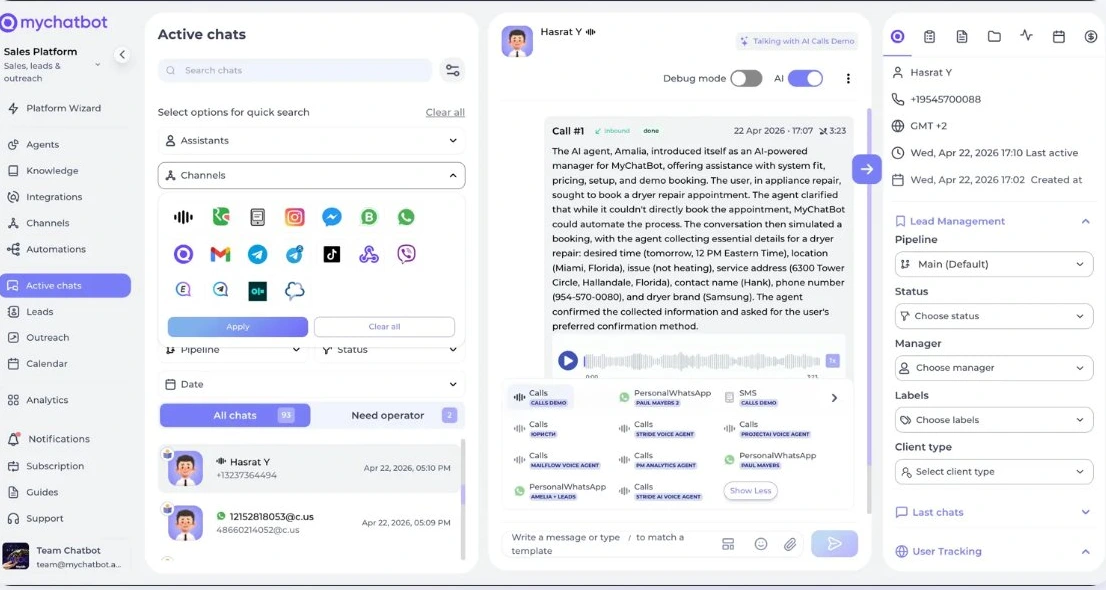
Client Inquiries, unified AI inbox with student profile and history
02 / 08
Booking Pipelines

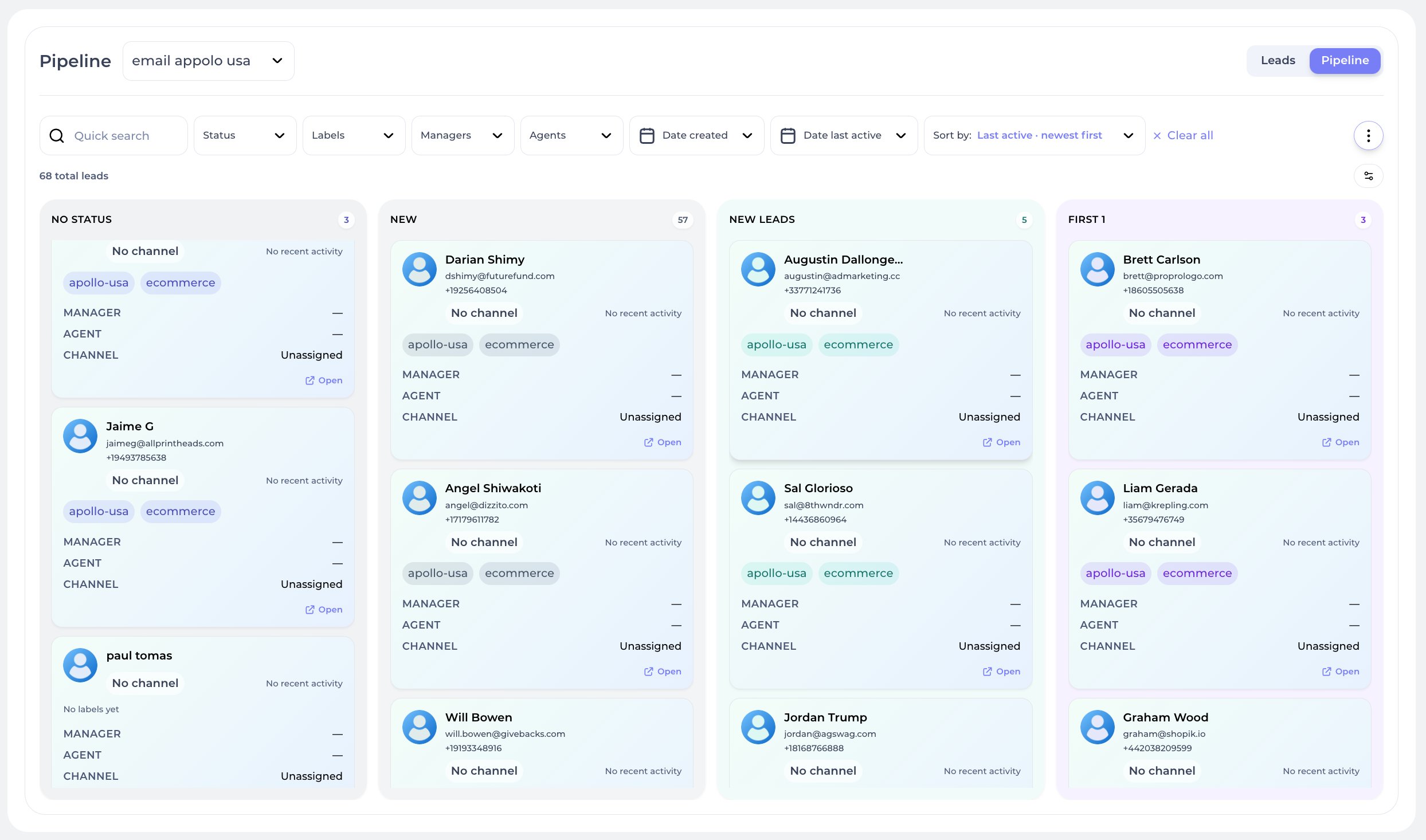
Studio pipelines: never lose a booking

Run separate pipelines per style, group or teacher. AI sets funnel statuses and labels on inquiries, and follow-ups use them to bring back students who have stopped booking.

  • Pipelines per style, level or teacher
  • Status and labels on every card, No Show mark in the native Calendar
  • AI proposes next action: rebook, next level, win-back
Studio pipeline, Kanban view with bookings across stages
03 / 08
Studio Calendar

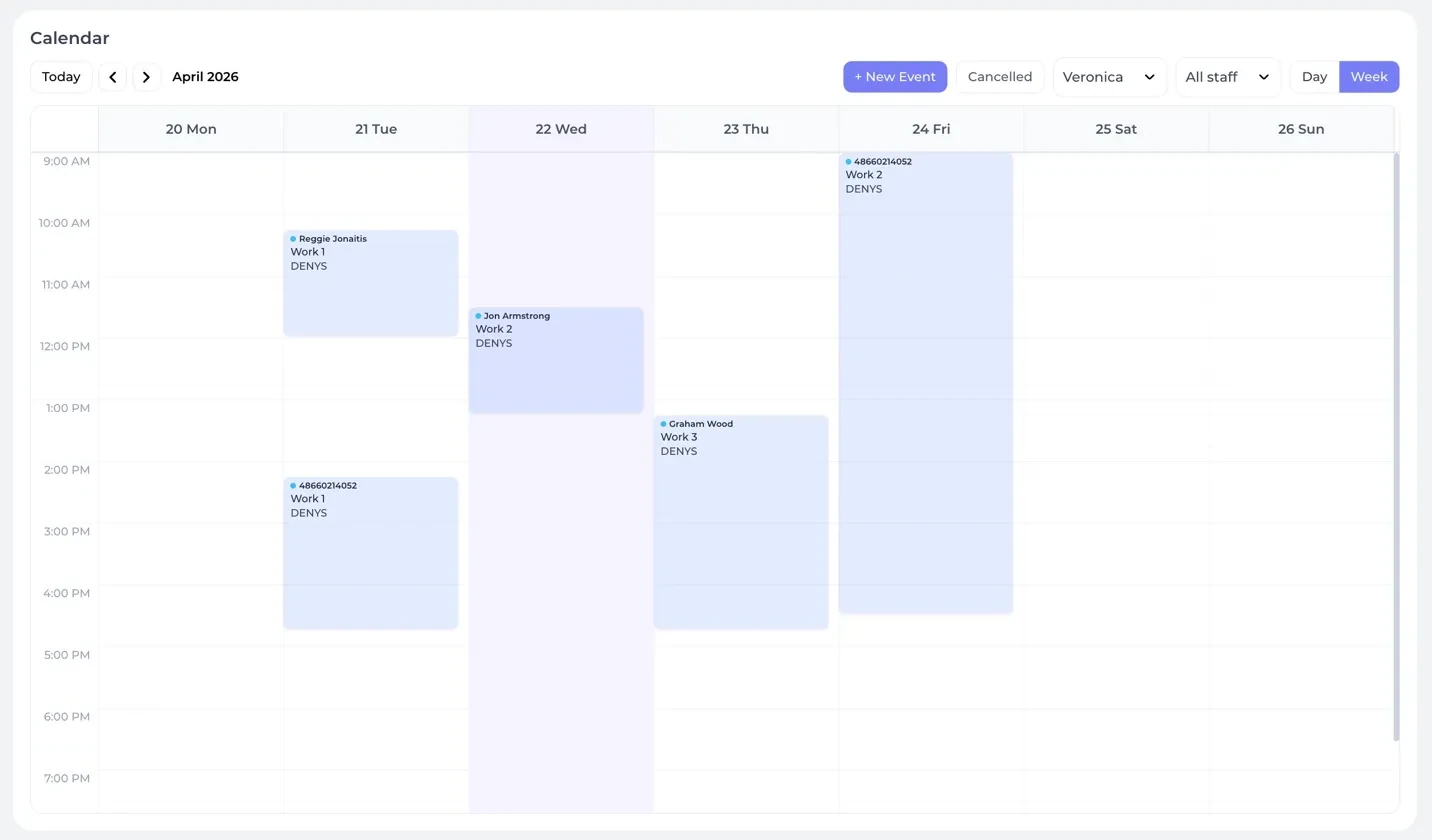
A calendar tied to teachers, classes and students

Every trial class, private lesson and rehearsal in one calendar, tied to the student profile and to your AI.

  • Day / Week / teacher views with drag-to-reschedule
  • Bookings auto-attach to the matching student and chat
  • AI can schedule a reminder before class in the student chat
Studio Calendar, week view with teachers and bookings
04 / 08
Any source → AI First

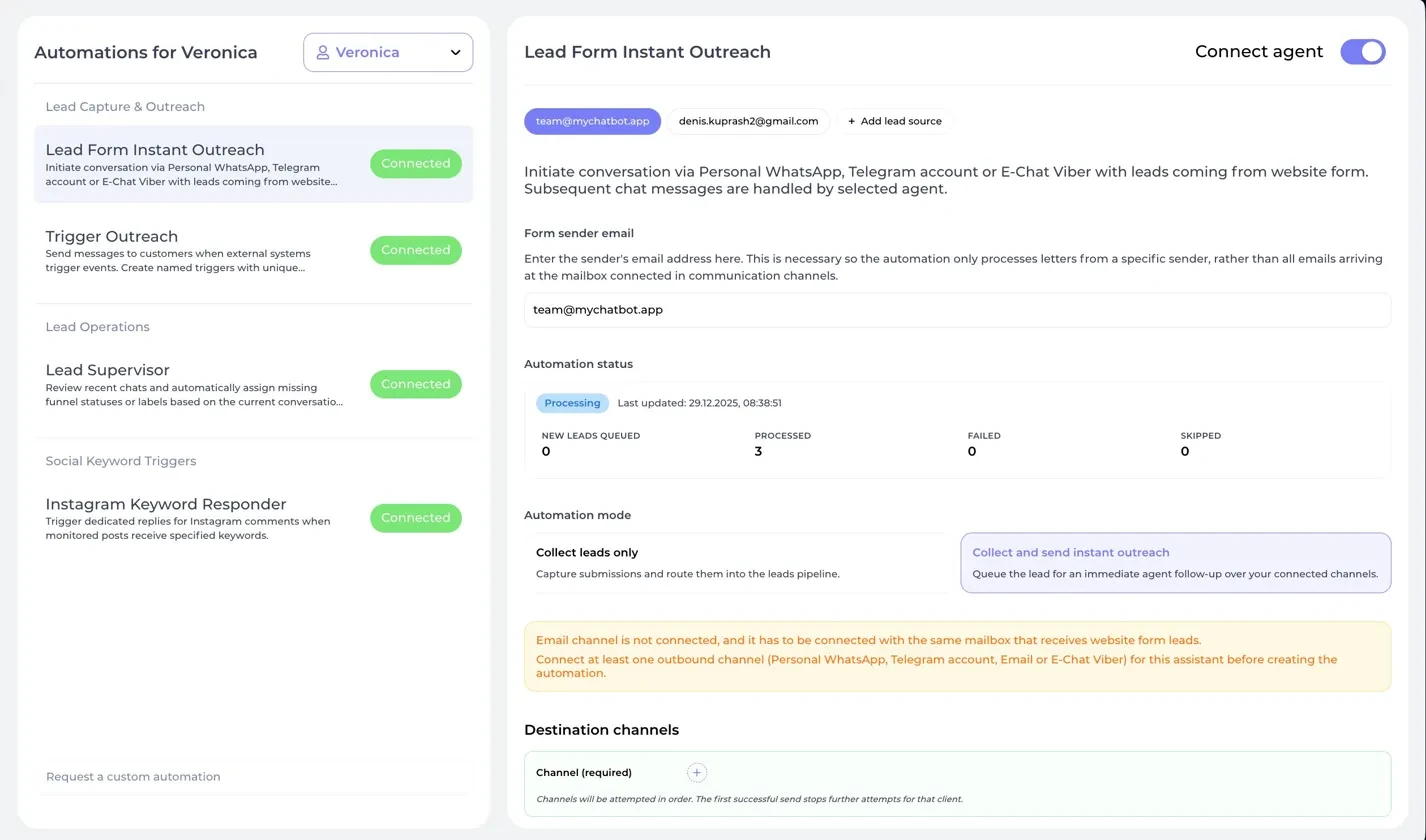
Connect every channel. AI replies first to every inquiry

Website forms, ads, messengers, webhooks, every lead is routed through AI agents that open the conversation instantly. No cold queues. No forgotten contacts.

  • Capture from booking form, DMs, ads, missed calls and API
  • Instant AI reply through Personal WhatsApp, Telegram, Viber, Voice
  • Auto-assign by style, teacher or location
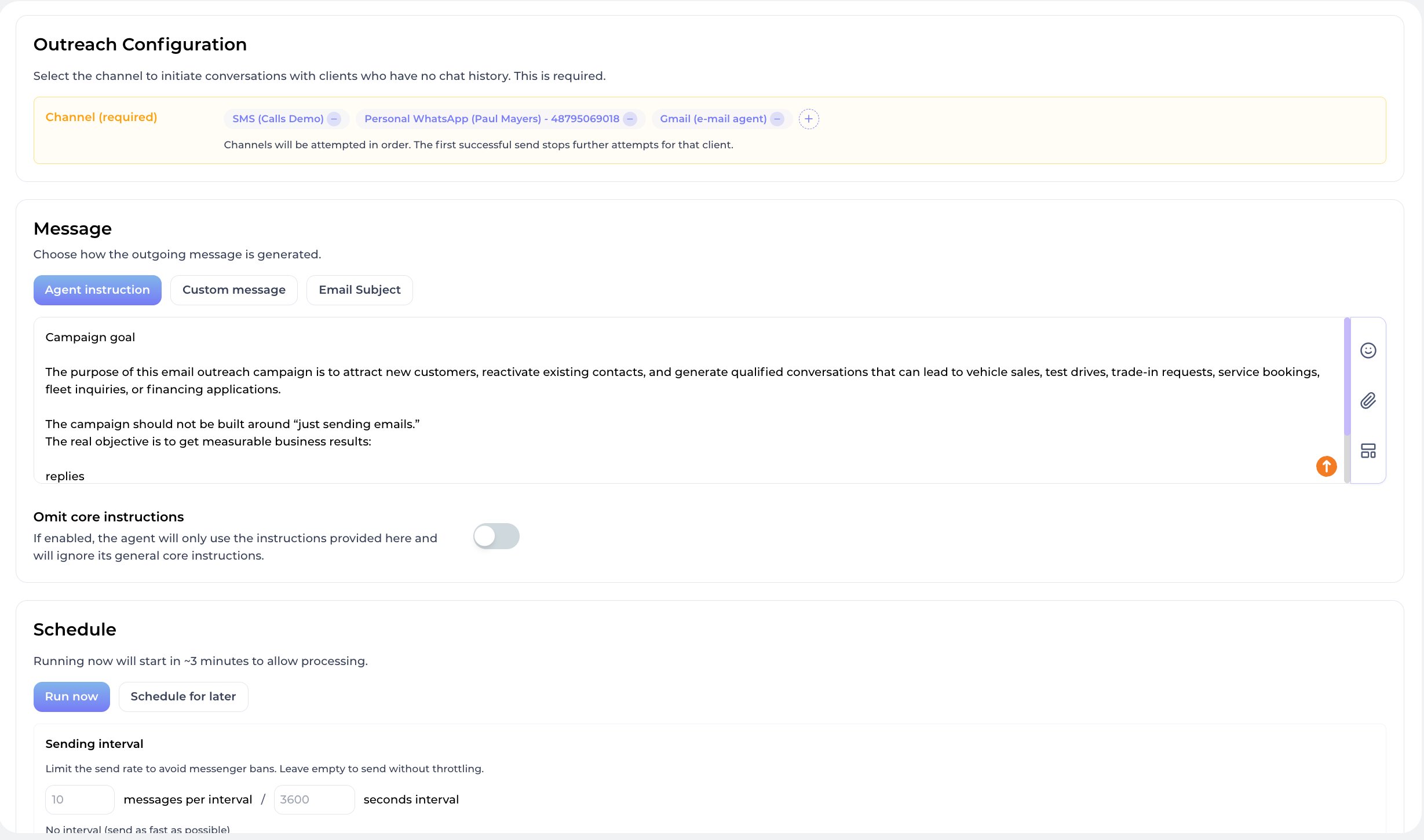
Client Inquiry Outreach, dance school lead capture automation
05 / 08
Studio Triggers

AI-triggered dance school automations

Wire any external event, payment, booking, form, webhook, into a chained AI sequence. Reactivation, reminders, confirmations, upsells, delivered by agents through the right channel.

  • Webhook-driven triggers with named sequences
  • Agent instruction or custom message per step
  • Multi-channel routing, tries until it lands
Studio Trigger Outreach, dance school event-based AI campaigns
06 / 08
Client Outreach

Personal offers for every student segment

Segment students by style, level, last booking and dormancy. AI sends personalized rebooking reminders and new-season offers.

  • Segments: kids, adults, regulars, lapsed, new
  • AI personalizes by class history, teacher and last booking
  • Paced sends with a configurable sending interval
Client Outreach, AI win-back builder for dance schools
07 / 08
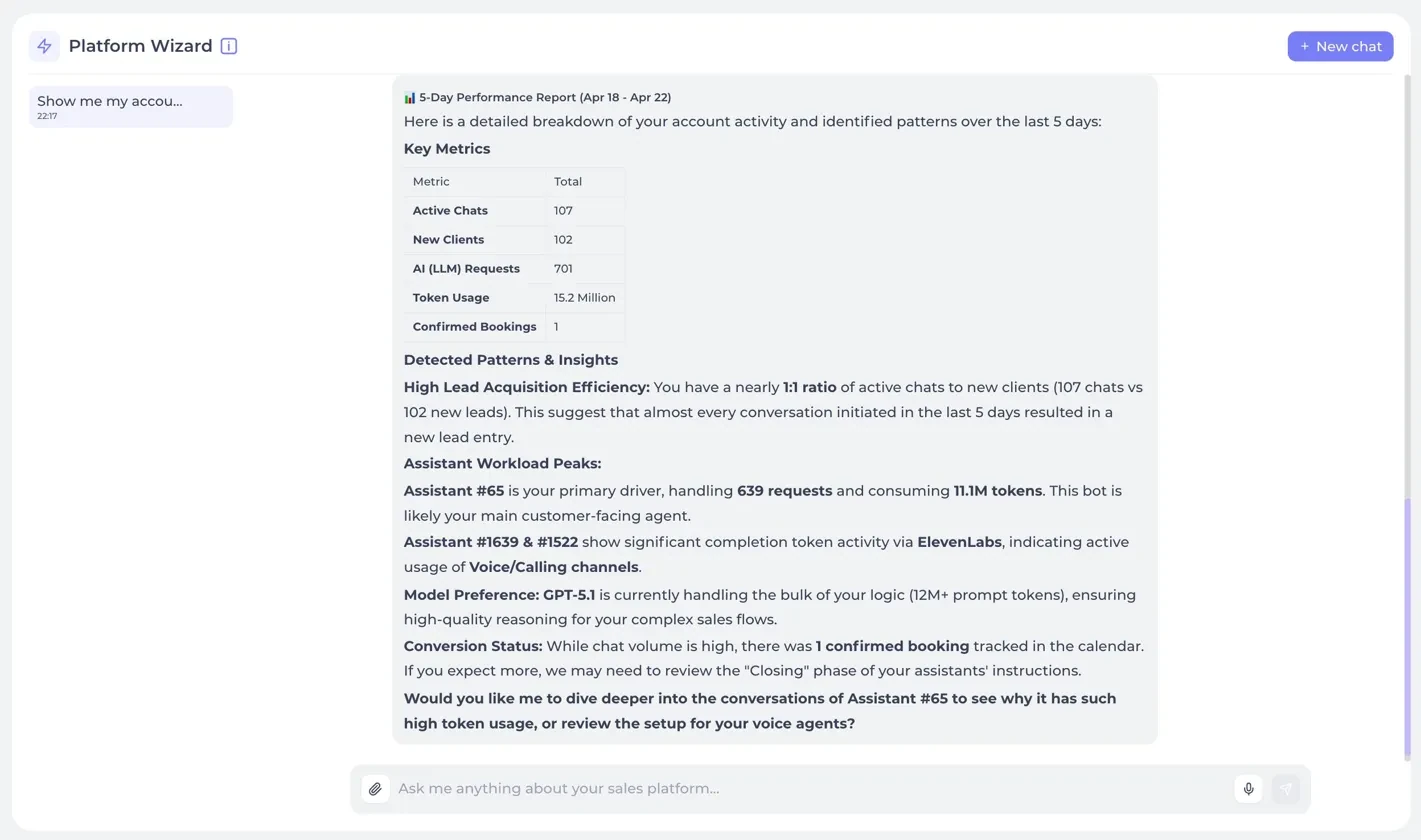
Studio Wizard

Your AI studio control layer

Wizard is a Claude-grade AI inside your studio CRM. Ask which teacher gets the most bookings, which students no-show, which style brings the most repeat bookings.

  • Ask anything across students, teachers, classes and campaigns
  • Wizard creates tasks, sends reminders, books slots
  • Multi-chat history per studio, fully auditable
Studio Wizard, AI control layer for dance schools
08 / 08
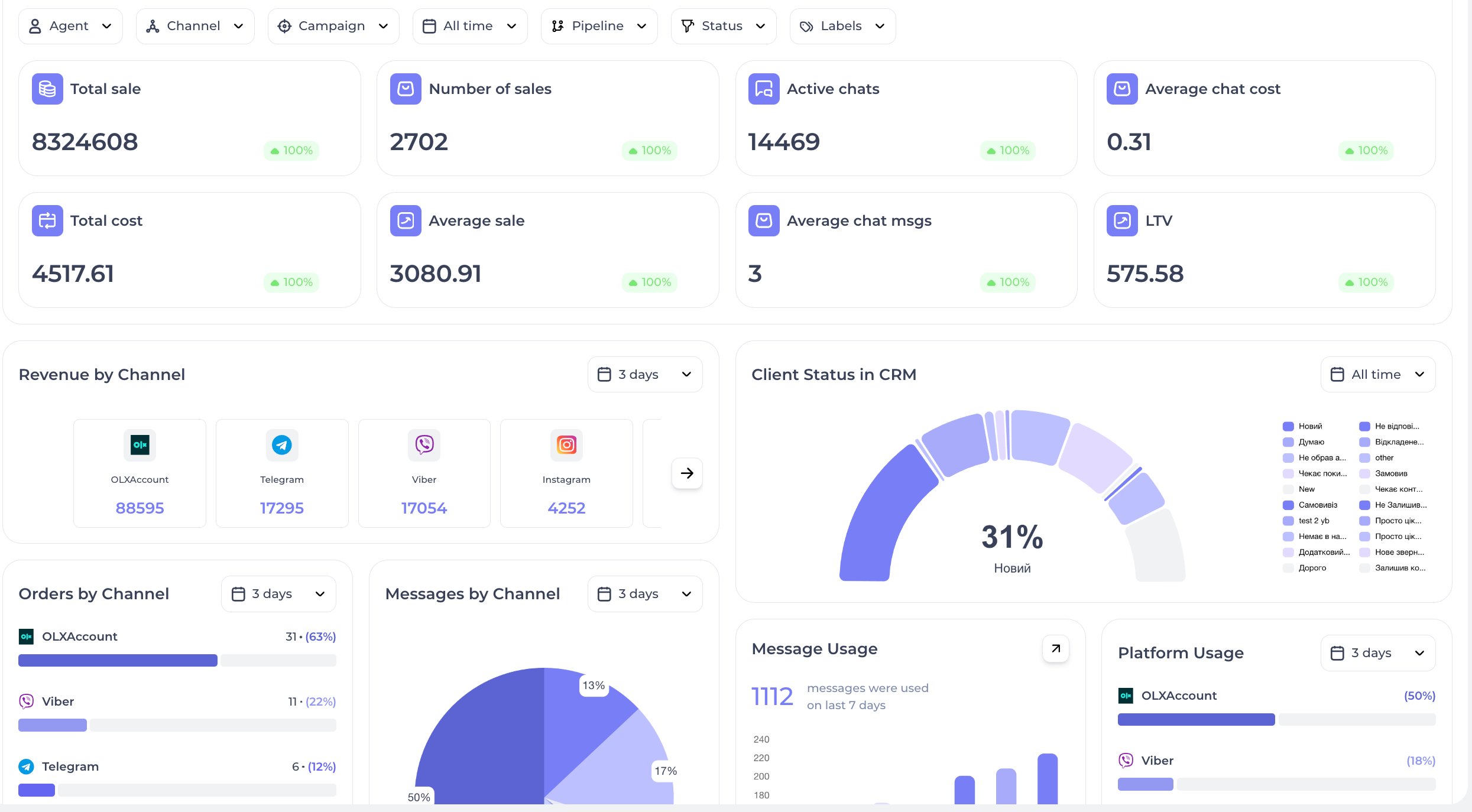
Studio Analytics

An AI studio control dashboard

Bookings, teacher workload, top styles, NPS, retention, lead-to-trial funnel. Wizard tells you which campaign brings students back.

  • KPIs: bookings, completion rate, no-shows, NPS, revenue
  • AI insights: best styles, best teachers, drop-off risk
  • Export to PDF, Google Sheets or live webhook
Studio Analytics, bookings, teachers and classes

Where dance school enquiries come from

A parent asks the starting age under a recital reel; an adult beginner looks for a salsa group at night. Each enquiry becomes a lead with its own chat, handled with the same knowledge and booking rules.

  • Instagram. The agent answers DMs and comments on posts and reels. Instagram Keyword Responder watches up to 100 selected posts for a word such as TRIAL. See Instagram.
  • Website widget. The Ad-Oriented widget rotates popup messages on an ad landing page; a click starts a prepared trial-class question.
  • Forms and lead ads. Lead Form Instant Outreach turns a form notification email into a lead and can write first; Lead Forms routes Facebook and Instagram lead ads to an agent.
  • Telegram. An ad link into a bot funnel stores source and campaign on the lead; a personal Telegram account connected instead answers after 30–40 seconds.
  • WhatsApp and phone. WhatsApp Business or personal WhatsApp, plus inbound calls with a transcript and recording.

Personal WhatsApp, a Telegram account, E-Chat Viber, E-Chat Telegram, email, SMS and calls are among the channels that can write first. A Telegram bot, the WhatsApp Business API, Instagram and the widget only reply to people who wrote first.

Three workflows for a dance studio

1. From a first question to a booked trial class

  1. Add styles, levels, age groups and prices to the Knowledge Base as an FAQ.
  2. The agent asks who the class is for, age, experience and a phone number, then sets a status such as trial_requested and a style label such as salsa, both created in advance.
  3. It offers open times from your calendar and books the trial class as an ordinary appointment. With Allow agent to self schedule follow-ups on, it can queue a reminder before the class.
  4. In the agent instructions, ask it to notify an operator about requests outside your content, such as hall rental. The chat is then flagged for attention, and if a Telegram group is connected under Flight Control, the notification arrives there with a chat link.

2. Season start

  1. Import past students from a Google Sheet with a label and pipeline, or use labels already on their cards.
  2. Create an Immediate outreach filtered by label, pipeline or a custom field such as branch, and check the Audience Preview.
  3. Test with an Audience limit of 1, then add a Sending interval, since mass sends on personal messengers risk anti-spam bans.

3. Students who stopped coming

  1. Staff or the agent set a status such as paused; Lead Supervisor fills missing statuses and labels on a schedule.
  2. Build a Postponed contextual follow-up on that status: two or three steps after silence, within Follow-up hours.
  3. Publish it and attach it under Toolkit → Follow ups; drafts never fire, and any reply stops it. See follow-ups.

Calendars and CRM a dance school connects

Each assistant takes one of Altegio, Wlaunch or Google Calendar and one CRM. The native Calendar can sit next to Google Calendar, but they share no bookings, so pick one as the master schedule.

  • Native Calendar. Teachers are staff with working days, the trial class is a service with duration and price, and Booking Instructions map teachers to styles. Missed visits can be marked No Show. Set the timezone first; it defaults to UTC.
  • Altegio. A returning student is matched by phone, so the agent can book, move a Tuesday class to Thursday or cancel it in the chat. If your Altegio setup confirms bookings by SMS, the student sends the code in the chat.
  • Google Calendar. The agent checks free time, creates and cancels events and can put the student’s name and phone in the description; no statuses or no-shows.
  • Built-in CRM. Pipelines per branch or for kids and adults, one status and several labels per lead, notes and tasks. The agent can file a parent’s callback request in Task Manager.
  • External CRM. In Kommo, HubSpot or Bitrix24 the record is linked to the student’s phone and carries an AI source plus a link back to the chat. Sync statuses imports CRM stages without writing back. See CRM sync.

Practical limits and where people stay involved

  • No attendance or pass tracking. MyChatBot does not log visits, count remaining classes, manage subscriptions or offer a trial-lesson module; a trial class is a booking.
  • Group classes need setup. The booking engine can seat several people per session without overbooking, but the Services form has no group-class toggle. The MyChatBot team configures a shared class, such as Wednesday hip-hop, for your account.
  • Parents. No parent accounts or consent features. Have the agent ask the student’s age and pass health, injury or progress questions to a teacher.
  • Silent calendar. The calendar sends no reminders and no message when staff move or cancel a class, and staff-added bookings can overlap; reminders come from follow-ups.
  • Work Hours. Off-hours messages get no agent reply, even after hours resume.

  • Shared balance. Replies, outreach and call minutes share one balance; at zero every assistant switches off until you top up, and restarting is not always automatic.
  • Plans. Google Calendar, Altegio and CRM integrations start on Pro; several active assistants, such as one per branch, start on Multipro. See pricing.

Handoff Control gives a chat to an operator when a teacher types your stop word or, in implicit mode, on any operator message. It can hide the switch and, with Auto return on, restores the agent after 24 hours or your interval. See human handoff.

Frequently asked questions

Can the agent book a trial class straight from an Instagram message?

Yes. The booking setup lives on the assistant, so an Instagram DM can end in a booking the same way a WhatsApp or widget chat does. With the native Calendar, Altegio or Google Calendar connected, the agent offers an open time, collects what your instructions require, such as a phone number, and books the trial class as an ordinary appointment. There is no separate trial-lesson module.

Does MyChatBot track attendance or class passes?

No. It does not record attendance, class passes or subscription balances. Keep those in your studio system. In MyChatBot, staff or the agent can set a status or label on the student card, and follow-ups can then target it.

Can several students book the same group class?

The booking engine can seat several people into one session and prevent overbooking, but the Services form has no group-class toggle. Group sessions have to be set up for your account together with the MyChatBot team.

How do we bring back students who stopped coming?

Give them a status such as paused. Then publish a Postponed contextual follow-up for that status and add it to the agent under Toolkit, Follow ups. It writes after the silence periods you choose and stops as soon as the student replies. For a season start, send an Immediate outreach to a label or pipeline with a sending interval.

Can the agent message parents who have never written to us?

Only through channels that can start a conversation, such as Personal WhatsApp, a Telegram account, E-Chat Viber, E-Chat Telegram, email, SMS and calls. A Telegram bot, the WhatsApp Business API, Instagram and the website widget only reply to people who wrote first. There are no parent accounts or consent features, so questions about a child’s health or progress should go to staff.

AI Channels for CRM

AI channels wired into your CRM system

Every conversation, every lead, every chat, flowing into one CRM. 20+ AI-powered channels across messaging, voice, email, SMS, personal accounts and custom APIs, unified under one customer record.

AI Instagram Agent

AI Instagram agent capturing DMs, comments and reactions, every interaction logged as a lead in your CRM.

DMs · Comments · Reactions

AI Facebook Messenger Agent

AI Facebook Messenger agent handling messages, comments and flows, all conversations attached to the CRM contact card.

Messages · Comments · Flows

AI Telegram Bot Agent

AI Telegram bot agent for automated replies, support flows, lead generation, and smart Telegram communication.

Bot · Support · Leads

AI TikTok Agent

AI TikTok agent for comments, direct messages, reactions, likes, and automated TikTok communication.

Comments · DMs · Reactions

AI Calls Agent

AI voice agent for inbound and outbound calls, phone numbers in 100+ countries, automated call scenarios.

Inbound · Outbound · 100+ countries

AI Ringostat Calls Agent

AI calls agent connected to Ringostat for telephony, call tracking, inbound/outbound calls, call analytics.

Ringostat · Tracking · Analytics

AI SMS Agent

AI SMS agent for sending, receiving, automating and scaling SMS communication with clients.

Global · 2-way · Automation

AI WhatsApp Business Agent

AI WhatsApp Business agent for official business communication, automated replies, broadcasts, and sales workflows.

Business API · Broadcasts · Sales

AI WhatsApp Personal Agent

AI WhatsApp personal agent for private chats, personal numbers, and all conversations inside one AI system.

Private · Personal · Unified

AI Website Widget Agent

AI website widget agent for sales, support, lead capture, and AI communication directly on your website.

Widget · Sales · Lead capture

AI Gmail Agent

AI Gmail agent for email communication, inbox automation, replies, and AI-powered email workflows.

Inbox · Replies · Workflows

AI Telegram Personal Agent

AI Telegram personal agent for personal chats, group communication, message analysis, and AI chat management.

Personal · Groups · Analysis

AI Webhooks API Agent

AI webhooks API agent for connecting any external application, custom API, automation, or AI workflow.

API · Webhooks · Custom

AI Viber Bot Agent

AI Viber bot agent for automated Viber messaging, support conversations, and AI communication flows.

Bot · Support · Automation

AI Viber Personal Agent

AI Viber personal agent for personal messaging, private chats, and AI-managed Viber communication.

Personal · Private · Managed

AI OLX Agent

AI OLX agent for managing client messages, inquiries, and sales communication from OLX in one system.

Inquiries · Sales · Unified

AI Twilio Agent

AI Twilio agent for voice, messaging, phone numbers, SMS automation, and global AI communication workflows.

Voice · SMS · Global

AI Google Agent

AI Google agent for Google-based communication, integrations, authentication, and AI business automation.

Google · Auth · Automation

AI iOS Chat Agent

AI iOS chat agent for mobile messaging and push, leads and replies flow directly into your CRM.

iOS · Push · Custom

AI Android Chat Agent

AI Android chat agent for mobile messaging and push, every interaction becomes a tracked CRM lead.

Android · Push · Custom
AI Templates for CRM

Ready-made dance school templates to launch your business

Twelve ready-made dance school templates, agent accounts and proven scenarios, pre-configured for studios, academies and online courses.

CRM AI Team

Build an AI team for your CRM

Assign clear roles across sales, support, operations and analytics, and power each agent with the skills your CRM workflow needs.

Agents

Sales Manager
Studio Manager
Closes deals in your CRM
Sales online
9 active tasks
Data Analyst
Booking Agent
Books trial classes
Analytics online
7 active tasks
Project Manager
Reactivation Agent
Brings back students who stopped coming
Operations online
8 active tasks
Sales Lead
Class Coordinator
Owns the pipeline
Sales online
11 active tasks
CRM Manager
Level Advisor
Runs the CRM workflow
Operations online
8 active tasks
CEO Agent
Pipeline Manager
Scores and routes new leads
Sales online
5 active tasks
Brand Marketer
Lead Qualifier
Handles CRM tickets & FAQs
Support online
10 active tasks
Finance Lead
CRM Manager
Never lets a CRM lead go cold
Sales online
6 active tasks
Performance Marketer
Support Agent
Runs personalized sequences
Outreach online
12 active tasks
Web Analyst
Reviews Agent
Asks students for a review in chat
Operations online
6 active tasks

Skills

Find the most loyal student
Leads Scoring

Surfaces the highest-value lead in your CRM right now, ready to be contacted.

Find the top-performing teacher
Team Performance

Identifies who on your team is closing the most deals and the fastest.

Find no-show students
Team Conversion

Finds bookings marked No Show in the built-in Calendar so you can bring those students back with a follow-up.

Find students without a follow-up
Pipeline Risk

Flags deals that have not moved between CRM stages for too long.

Find students without a reply
Inbox Follow-up

Surfaces every contact waiting on a response, no conversation goes cold.

Find the best lead source
Marketing Attribution

Identifies the channel delivering the most qualified CRM leads.

Find problem stages
Funnel Diagnostics

Detects the CRM pipeline stage where most deals get stuck or lost.

Find reasons for cancellations
Insights Revenue

Analyzes closed-lost deals and extracts the top reasons customers walked away.

Show sales dynamics
Analytics Trends

Plots revenue, new leads and closed deals over any time window.

Show manager workload
Team Capacity

Reports how many leads, deals and tasks each manager is handling right now.

News & Updates

What's new in AI CRM

Product updates, case studies and fresh scenarios.

Get started

See AI CRM running on your business

Leave your details, we'll set up a live demo on your channels, with your pipeline and your real leads. No slides, no theory.

  • Personalized 30-minute demo
  • AI agent set up on your real channel
  • Deployment plan tailored to your team

By submitting, you agree to our privacy policy. We reply within one business hour.

New type of CRM

This is not the CRM
you used yesterday. This is AI CRM.

Chats, leads, pipelines, calendar, outreach, automations, tasks, documents and analytics, one AI system, one Wizard command layer, zero spreadsheets.